Troubleshooting
Thermador or Wolf Oven Not Heating? Check This First
November 8, 2026
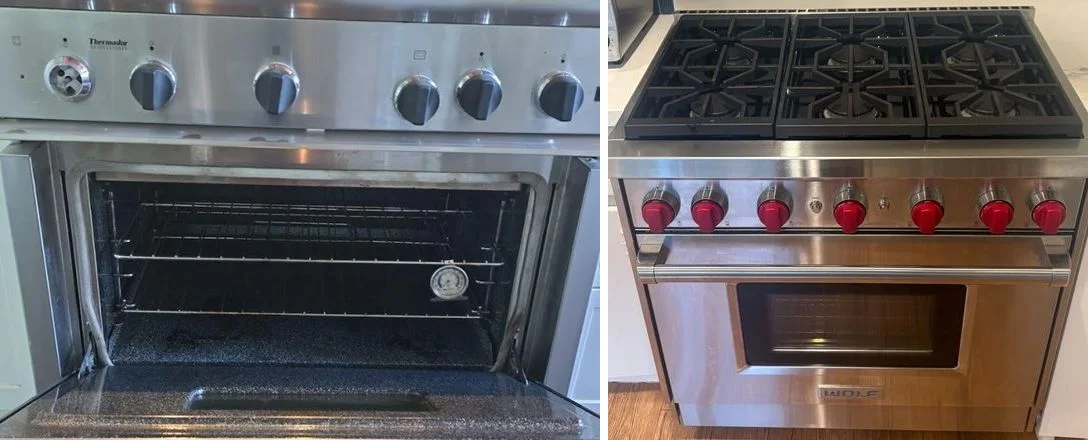
A Thermador oven not heating is often less serious than it looks. Before you assume a failed part, there are a handful of things you can check from the outside in about ten minutes, and several of them have nothing to do with a repair. The same is true of a Wolf oven that stays cold. This guide covers the safe checks for both brands, explains which settings can stop an oven from heating, and lists the problems that need a technician so you know when to stop.
If you smell gas at any point, leave the house and call your gas utility or 911 from outside. Do not turn lights or switches on or off. Nothing in this guide asks you to open an appliance panel, work on gas lines or touch the 240-volt wiring, and you should not do those things yourself.
Start With the Safe Checks for a Thermador Oven Not Heating
Work through these in order. Each one takes a minute or two.
- Make sure a temperature is actually set. Thermador’s use and care guide for its Professional built-in ovens lists a missing cooking temperature as a cause of “Oven is not heating,” along with a power problem. Pick a heating mode, set a temperature and give the oven a few minutes.
- Check the oven’s breaker. Find the breaker for the oven in your electrical panel. If it has tripped, switch it fully off and back on once. If it trips again right away, stop and do not keep resetting it, because that points to an electrical fault that needs a professional.
- Look for a locked control panel. A locked panel can look like a dead oven. On the Thermador ovens in that guide, the oven must be in standby, then you press and hold LOCK for 4 seconds. Models without a LOCK key use the TIMERS key instead. On Wolf E Series ovens, you touch and hold LOCK for three seconds to lock or unlock the controls.
- Check for Sabbath mode. Sabbath mode disables the controls on purpose, so the oven can seem unresponsive. On Wolf ovens, a Sabbath indicator appears on the touchscreen. On the Thermador guide’s ovens, all controls stay disabled once Sabbath mode starts, and you cancel it by turning the mode and temperature selectors to OFF.
- Check whether a self-clean cycle is still in progress. Thermador’s guide says the door locks automatically during self clean and stays locked until the oven has cooled. If the door remains locked after cooling and the door-lock symbol is lit, the guide says to turn the oven off at the circuit breaker, wait five minutes and turn the breaker back on.
- Think about demo mode (Thermador). Thermador’s basic settings include a Demo mode, which is generally meant for showroom displays. If an oven shows normal controls but never heats, especially right after installation, ask your installer or Thermador support whether it is on. The guide says the setting can only be changed within five minutes after the oven is connected to power, so this one is for the installer or support to handle.
Settings That Can Stop an Oven From Heating, by Brand
Both brands have features that block heating or disable the controls. Names and button sequences vary by model, so use your own guide for the exact steps.
| Feature | Thermador (Professional built-in guide) | Wolf (E Series support pages) |
|---|---|---|
| Panel lock | Oven in standby, hold LOCK for 4 seconds (models without LOCK use TIMERS) | Touch and hold LOCK for three seconds |
| Sabbath mode | All controls disabled once it starts; turn mode and temperature selectors to OFF | Indicator on the touchscreen; check it before assuming a fault |
| Power reset | Breaker off for five minutes if the door stays locked after cleaning | Breaker off for 10 to 30 seconds, depending on the page and the symptom |
| Demo or showroom setting | Demo mode in basic settings, changeable only in the first five minutes after power is connected | Not covered in Wolf’s official pages |
Wolf’s general support page lists the power supply, the control board and an electrical issue as the causes behind an oven that does not operate, and it starts with checking Sabbath mode and resetting the breaker. Its E Series page adds the control lock. If those steps do not help, Wolf directs you to service.
Electric Versus Gas Models
Your oven’s fuel changes what the symptoms mean.
Gas ovens. If the cooktop burners light normally but the oven does not heat, the gas supply to the house is fine and the problem is inside the oven. A gas oven that takes a long time to light, or that glows without lighting, usually points to the igniter. Igniters and gas valves are not owner repairs. Our guide to a gas oven not heating explains what a technician looks for.
Electric ovens. If the oven bakes poorly but the broiler works, or the reverse, tell the technician which one works. That one detail narrows down which element has failed.
On dual-fuel and range models, the cooktop and oven are separate systems, so a working cooktop does not rule out an oven problem. Our range repair and oven repair pages cover both.
Common Causes of a Thermador Oven Not Heating
If the safe checks do not fix it, these are the usual suspects, on Wolf ovens as well. All of them involve electrical or gas components, so they are jobs for a professional.
- Bake or broil element (electric). It may be cracked, blistered or burned through, and the oven may warm slightly or not at all.
- Igniter (gas). It glows but does not light the gas, or it lights slowly and then fails.
- Temperature sensor. The oven runs too cool, shuts off early or reads a temperature that does not match a thermometer on the rack.
- Thermal fuse. It can blow after an overheating event and cut power to the heating circuit.
- Relay or control board. A dead or erratic display, or controls that respond but never trigger heat, can point here.
Error codes on the display are useful clues, but the meaning depends on the model, so give the technician the code exactly as shown instead of searching for it online.
What to Tell the Technician
A short description saves time and often saves a second visit. When you call about a Thermador oven not heating, have:
- The brand, model and serial number (on the data plate, often inside the door frame or on the side of the oven).
- Whether the oven is gas or electric.
- What the display shows, including any code, exactly as written.
- What you already tried: temperature set, panel lock, Sabbath mode, breaker.
- When it started, and whether it happened after a power outage, a self-clean or a cleaning.
- Whether bake works but broil does not, or the reverse, and whether the cooktop works.
Thermador and Wolf Oven Repair in Los Angeles
We are experienced with Wolf and Thermador ovens, ranges and cooktops, and we repair all other major brands as well. See our Thermador and Wolf pages for the models we service. For other premium-brand problems, our guides to Sub-Zero not cooling and Sub-Zero error codes follow the same safe-checks-first approach.
You get a written quote before any work starts. For labor prices on ovens and ranges, see our oven and range repair cost guide. The diagnostic is $85 and is applied toward the repair when you approve the work, and repairs carry a 30-day labor and 90-day parts warranty. Call (323) 806-3039 or book online.
Quick Answers
Why is my Thermador oven not heating but the display works? The most common non-repair reasons are no temperature set, a heating mode that was not started, or Sabbath mode. If those are clear, the cause is usually an element, an igniter, a sensor or the control board.
Is it safe to reset a Wolf or Thermador oven at the breaker? Both manufacturers publish a breaker reset as a troubleshooting step for certain symptoms. Turn the breaker off and on once. If it trips again, stop.
Can I fix a Thermador or Wolf oven myself? The checks in this guide are safe for an owner. Replacing an element, igniter, sensor or board involves the gas supply or 240-volt wiring and should be left to a technician.
How do I know if my oven is in Sabbath mode? Wolf shows an indicator on the touchscreen. On Thermador ovens the controls stop responding once the mode starts. Check your guide for how your model displays it.
Sources: Thermador use and care guide, Professional Series built-in ovens; Wolf: does not operate in one or all modes; Wolf E Series: touch pad or control not working. Features and button sequences vary by model and series.